
In my last post, I promised that I would update soon with a guide for other Blogger-bloggers who would like to know how to create Category-specific RSS feeds. 

This is something that can be done easily enough on self-hosted Wordpress, but it isn't quite so intuitive on Google's free blog-hosting service. Nevertheless, just because you're not ready to pay for hosting just yet, that doesn't mean you should be left out of the Category Feed Party! (Oh yes, it's a party.)

As a matter of fact, I've received so much feedback lately about certain things I've managed to do on my blog, despite Blogger's seeming limitations, that I have decided to start a new, ongoing segment on Smithereens called Things You Didn't Know You Could Do On Blogger. So sit back, grab a cool drink and enjoy this, my first entry in this new series. 


First of All: Why?

Right off the bat, you may be wondering: 'What's the point of Category-specific feeds anyway?'  Fair question. Well the short answer might go something like this: If Content is King, then Choice is the next-on-command.  

To provide a real illustration, you may want to read my last entry if you haven't already to get an idea for why I felt the need to split up my content here on Smithereens into just three succinct categories. (Productivity, Persuasion, Prose.)

Next, you could take a look at the popular productivity blog Lifehacker as a secondary case study. While obviously not on the free Blogger platform, LH does cover a broad subject base-- anything related to productivity, from useful gadgets to scheduling haircuts with Google Spreadsheets

They also post a lot. As in often. So, to help readers whose interests may lean closer to certain categories than others, they too offer feeds by category (or "tag".) 

So now that you can't call me crazy because I've cited a wildly popular pro-blog that agrees with me, let's assume you're on-board and just can't wait to find out how you can replicate my categorical feed-burning.

Step One: Clean House

If you've decided that your readers would benefit from having more options when it comes to subscribing to your blog, the first order of business is to make your list of categories somewhat usable.

Depending on how old your blog is, this could take 5 minutes, or 5 hours, and it could very well be the most difficult part of this process. But trust me, it will be worth it. 

Many Bloggers (myself included, up until last week) fall into the trap of using Blogger's Categories as a whatever-pops-into-our-head list of tags. 

The result is an unwieldy and largely unusable list of random words, instead of a short, precise and intuitive list of categories that can be used for navigation. 

So, to avoid this predicament (if you're just starting out) or to fix it (if you're a long-time offender like I was), you'll need to either choose a short list of categories and stick to it (for the former) or go through and remove all your tags post-by-post and replace them with the useful categories (for the latter.)

(If you've been Blogging and miscategorizing for so long that it's impossible or just very implausible for you to actually go through all your posts and do this, another option is just to turn over a new leaf as of now: Draw up a more precise list and stick to it going forward. Your resulting feeds won't be comprehensive, but at least your Categories will be useful going forward.)

Ok, so come back to me when you have trimmed down your Categories to a list of ten or fewer (any more and you'll subject your readers to analysis paralysis.) I'll be here when you get back.

And when you do return, it will be time for the fun part: Burnination!


Step 2: Burn The Feeds

Now that you have a beautiful, simple list of Categories, it's time to burn a special RSS feed for each one and be done with it. 

I'm going to explain the process using Feedburner because it is both a) what I use here; and b) the most popular feed-burning service out there. However, you may be able to use part of these instructions to burn feeds in your service of choice. 

Head over to Feedburner.com and log in (or sign up if you haven't already.) 
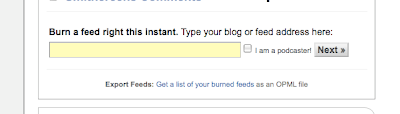


Next, on the main page you'll see a box that says "Burn a feed right this instant..." (see screenshot above.) 

Into that box you're going to want to type the following URL:
 
http://YOURBLOG.blogspot.com/feeds/posts/default/-/YOURCATEGORY/


Where YOURBLOG is.. your blog name and YOURCATEGORY is... ok, ok, just making sure.

Wait! I know Feedburner is beckoning you to "Burn a feed right this instant", but just hold your horses, because there is one more thing to consider.

If you have a large blog with lots of posts (especially if they are long articles) and if your category contains 20 or more posts, you will probably run into an error trying to burn your feed because Feedburner will basically tell you that you talk too much. Don't take it personally. 

But alas, I have a solution!

All you need to do to get around this issue is add the following string, "?max-results=10", without the quotes, to the end of your URL, which will make the final thing look like this:

http://YOURBLOG.blogspot.com/feeds/posts/default/-/YOURCATEGORY/?max-results=10

If you didn't already guess, you're basically telling FB now to limit itself to only the last 10 posts in that category. That should shut 'em up.

Finally, add a Title, maybe something like "YOUR BLOG- YOUR AWESOME CATEGORY" (I know, I'm a creative genius) and you'll be done. FB will spit out a new feed URL that you can then link to on your blog, and those who subscribe to it will get only the posts that you Categorize accordingly. 

Lather, rinse, repeat with the rest of your Categories and Voila, you're well on your way to offering your own readers some great new options as to how they consume your content.

---

Did you like this post? Want to see more like it? Then let me know in the comments or feel free to pass the word along on your social medium of choice. Thanks!

Is there a specific thing you're trying to do with your Blogger blog that you can't quite figure out? Well likewise, leave a note in the comments and I will try my best to help you out. And if enough people share your query, I'll make it the topic for my next installment of TYDKYCDOB. (Now that's a winning acronym if I ever saw one.)


A Quick Housekeeping Note:

As you can see, I've made some changes to the Smithereens template yesterday as well. But going to this new, whiter look wasn't strictly an aesthetic choice (although I do think it looks really clean.) Rather, it was the only way we could fix a loading bug that had been plaguing the site for awhile. 

You had probably noticed that Smithereens always loaded kind of slowly. Well after a day of widget-chopping and CSS-wrangling, I, with the tremendous help of Rebecca Leaman (of the Domestik Goddess and Wild Apricot blogs) was able to get the loading time under wraps. To that end, every widget that wasn't essential has been banished from my sidebar (sorry Blogrush, Statcounter.com and Pepperjam.)

But even after removing these widgets, the site still "seemed" to load kind of slowly because the old dark grey background would load first and the white content background last, meaning that readers couldn't really read the blog until every single thing on the template had loaded first. To put it simply, by switching everything over to an all-white background, you can now read the content milliseconds after arriving on the page. Mission Accomplished. 

So, what do you think of the new look and load time? I'd love to hear your feedback in the comments.      

Can you even imagine a pun that is more high-brow than the one I just used in this post's title? (I certainly Kant.) But fear not, this post is not about deontological philosophy, it's just about categories. On this blog. And how important it was that I started using them effectively.

You see, I realized last week that my long-and-growing list of Categories and accompanying tag cloud (see left) was becoming unwieldy and largely unusable. Chris Pearson's recent post on the importance of keeping categories trimmed to avoid provoking analysis paralysis in your blog visitors really hit home and I decided to do just that.

And so from my old, never-ending list of 100+ labels, I pored through every post and pared them back to just three, which coincide with this blog's three main themes: productivity, persuasion and prose. (I also added a few others like "technology" to denote the tech-heavy productivity posts and wordplay-wednesdays and marketing-wednesdays to set apart my ongoing series.) But the main purpose here was to create categories that were actually usable.

Finally, my categories are specific and few enough to truly be used as navigational devices,  which Pearson advocates, rather than just a (pretty, but ultimately) useless cloud of stream-of-consciousness spouting.

Next, I went to work, looking for ways to leverage my newly trimmed categorical list in a way that would help my readers.

Enter the new navigational bar.

Yeah, My Blogger Blog Has a Nav Bar Now, What's It To You?

As you may or may not have noticed, Smithereens is sporting a spiffy new navigational bar across the bottom of the header (if you're on the site and missed it, scroll back up and admire, or if you're reading this in a reader, click on through and check it out.)

Now this may not seem like a very big deal, but the lack of easy nav bar implementation on Blogger blogs is a notorious shortcoming of the platform. It took some serious template tweaking to get it working. (Oh and if the header looks horrible to you, instead of slick and seamless, you're probably using IE version 6 or earlier. Why are you doing that? It's time to upgrade to Firefox. Or at least get IE7+ for the love of standards-compliant browsers! But if you're not on an antiquated browser and it still looks funky, please let me know in the comments as I'm trying to quash the last of the template bugs as quickly as possible.) 

But what's important about the new navigation bar (and relevant to this post) is the addition of the "Choose a category" buttons. Let me explain my rationale for adding these, and explain what it means for you.

The New Smithereens Blog Buffet (It's All-You-Can-Eat)

When I started this blog just 6 short weeks ago, I wasn't sure exactly where it would take me. I knew that my most passionate interests were (and still are) writing, marketing and general lifehackery, so I decided to set those three subjects (poetically paraphrased as productivity, persuasion and prose) as my basic slalom poles, to use a skiing metaphor. 

But one thing I have noticed recently is that having such an eclectic subject base can cause splintering among my readership. For example, the readers who were most enthralled with my Twitter Wit Writing Contest are not the same as those who drove my gadgety iPhone scoop post to 600 Diggs and beyond.

The problem came to a head when I started to feel as though posting about productivity and technology was putting off those who were more interested in writing or marketing, and vice versa. As the saying goes, you can't please everybody all of the time, only some of them, some of the time.

And so, I felt like I had to do one of three things to fix this issue: 

1) Split the blog into two - one on productivity/technology/gadgets and one on writing and persuasion, 
2) Narrow the focus of my blog down to just one or the other and stop writing about some of the things that interest me; or 
3) Provide mored ways for readers to dynamically choose what content they consume. 

After consulting with many of my trusted friends who've been blogging much longer than I, I decided that the third option was the best idea for now. (I don't have the time to properly maintain two personal blogs right now on top of client obligations, and I don't want to limit the scope of my writing just yet.)

And so, dear readers, now you can choose exactly which type of smithereen you want to take in on any given visit, and which you'd rather ignore. It's a buffet of useful ideas and now you can skip the salad bar and load up on dessert at your leisure. 

If you like gadgets and productivity but could care less about how to differentiate tricky homonyms, click the Productivity tab (which also encompasses technology articles) and go to town. If you entered the TwitWit contest 3 times (I'm looking at you, washwords), but all the iPhone chatter drives you batty, click the Prose tab, and maybe the Persuasion one, and enjoy reading only the content you want to read. 

Or if you're eclectic like me, and like all kinds of subjects, then...well... carry on. As you were.

But what about the many of you who follow my content by RSS or email? You're thinking: 'What do I care about all this? I never even go to your site.' (Thanks a lot.) Well don't worry, I thought of you too.

Brand Spanking New RSS Options, As Well

As of right now, not only can you get your Smithereens fix in subject-specific morsels on the site, you can also get separate post updates for free for any of the 3 categories. 

This endeavour took a bit of Blogger hackery as well, and I am writing up a brief tutorial to post later tonight in case others are wondering how to do this, but the point is, you RSS addicts now have options too, so it was worth it: 

For the Productivity feed, click here.

For the Persuasion feed, click here.

For the Prose feed, click here.

And of course, for the regular all-for-one-and-one-for-all feed, you can just click here. 

I hope you find these tweaks helpful, and a good alternative to splitting the blog up into different sites. But what do you think, will you use the new Categories for navigation, or not? Let me know in the comments, I really appreciate the feedback.

---
By the way, I know there was more silence than usual these past few days - I hope you'll understand. Along with the many changes I've been making to the Smithereens template, navigation and feed architecture, I've also added a couple neat plugins, like the informative contextual popups you can see in this post from Apture (an article on this service is forthcoming, too - very neat implementation.) 

As well, I've been knee-deep in preparation for the launch of my first client blog for NewHomeAssociation.ca, an innovative company in Ottawa that is aiming to be the MLS for new home listings. It should be live tomorrow and I will update this post with the address so you can check it out. 


I've spent most of the day today running around Ottawa and visiting as many Rogers and Fido resellers as possible to get a handle on how well the 3G iPhone launch is going.

The Verdict? 

Well, for the most part, it isn't going at all.

First of all, let's talk stock.

By the looks of things, my assertion one week ago that Rogers stock of phones had been depleted was correct, having been confirmed multiple times today by reps who admitted they had originally been expecting many times more units than they received for today's launch. 

Most locations said they were expecting 100 or more iPhones at first, but they received on average (of those who would tell me how many they had) just 6-15. 

Secondly, my suggestion yesterday that Rogers was likely diverting the bulk of its iPhones in each city to the special corporate "launch party" locations also seems to have proven true, as many stores today were actively pointing customers in the direction of these central corporate stores saying "They have 10 times as many as we do."

And I can understand why they would want to send customers away: Many stores couldn't sell their iPhones today if they wanted to, since the Rogers account database (SalesCentral) was down for most of the day, crushed under the weight of so many simultaneous activations. (Something Rogers isn't used to, perhaps?)

Every single store I visited today had the same story: They were able to activate a few lucky customers who were at the front of the lines this morning, but soon after, the database started crashing erratically. Every rep I spoke to had a tale or two about customers who showed up at 9:30 or 10am and didn't leave with their iPhone until noon or later. 

In essence, to describe this launch as anything but chaotic would be quite a stretch.

Customers lined up for hours at certain (albeit not all) non-corporate locations, only to be told upon entering that no iPhones would be sold as upgrades for existing clients. (Nothing like a blatant cash grab to show customer appreciation.)

Others waited in line only to find out that they could not purchase an iPhone either because they were on a family plan or a corporate coded account. 

Employees cursed under their breath as they repeatedly tried to log in to the customer database. Said one rep: "I keep trying to call the backup 1-800 number to activate manually, and they just keep hanging up on me!"

And while most stores eventually sold their limited stock to the most patient of consumers, one store that had received 15 units only sold 8 today because it took so long to activate them between system crashes that everyone else who had waited in line walked out and left sans iPhone.

The frustration was evident in the eyes and vocal tone of nearly every employee I spoke with today. It's no wonder: they had been thrown to the dogs and there was little they could do about it.

One Rogers employee spoke with me candidly and his sentiments sum up today's general atmosphere quite well:

Our systems have been down all day. Estimates are we might be back up tomorrow. Maybe not. I am swimming to find another job on short notice so I can quit. I have never been so angry in my life.  This is the biggest cluster#$%^ I've ever been a part of and I hope Rogers gets absolutely crucified in the media for this. 

Well, crucifixion may be a little harsh, but it sure would be interesting to see them tell it like it is for once.

To be fair, Rogers isn't the only one running into issues with this launch (on Apple's part, the worldwide iTunes sites required for activations has been very unstable or down all day as well), but somehow I'm just not surprised that they seem to be handling it the worst of any other provider. 

Frankly, everything that possibly could have gone wrong here (short of not having any stock at all) has gone wrong and it looks like those who decided to stay home were right.

So to all the employees who dealt with enraged customers all day long and to all the eager early adopters who have only adopted migraines, head on over to your nearest 7/11 because at least it's Free Slurpee Day. Go on, you deserve it. 


UPDATE: After catching up on my reading for the day, I've learned that the iTunes failure is even more widespread and i-Pocalyptic than Rogers' own monumental internal server issues (and that's saying something.) 

I won't re-tell a story that has been told a thousand times by now. But basically, this just that means the poor customers who DID get their iPhones unlocked on Rogers' end couldn't get them activated by Apple anyway... What a mess. 

Looks like Apple is deserving of their very own Fail Whale this time, too.  
 
---

How about you - got an iPhone launch horror story of your own? Well misery loves company, so dish in the comments, my friends!